QRYVEX transforms complex crypto market data into clear, evidence-based insights, helping you discover opportunities and understand the forces behind market movements.
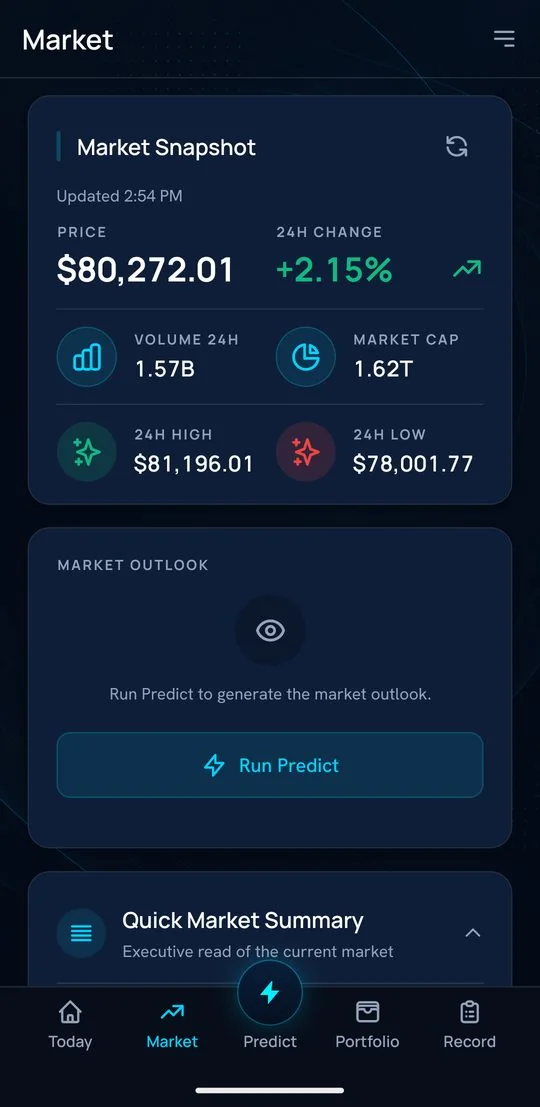
The Market Snapshot gathers price, 24-hour change, volume and market cap for the pair you choose, with the 24-hour high and low. It is the reference point for every reading that follows.
Price and 24-hour change
Volume, market cap, and the 24-hour high and low
A prompt to run an analysis when you want more than a glance
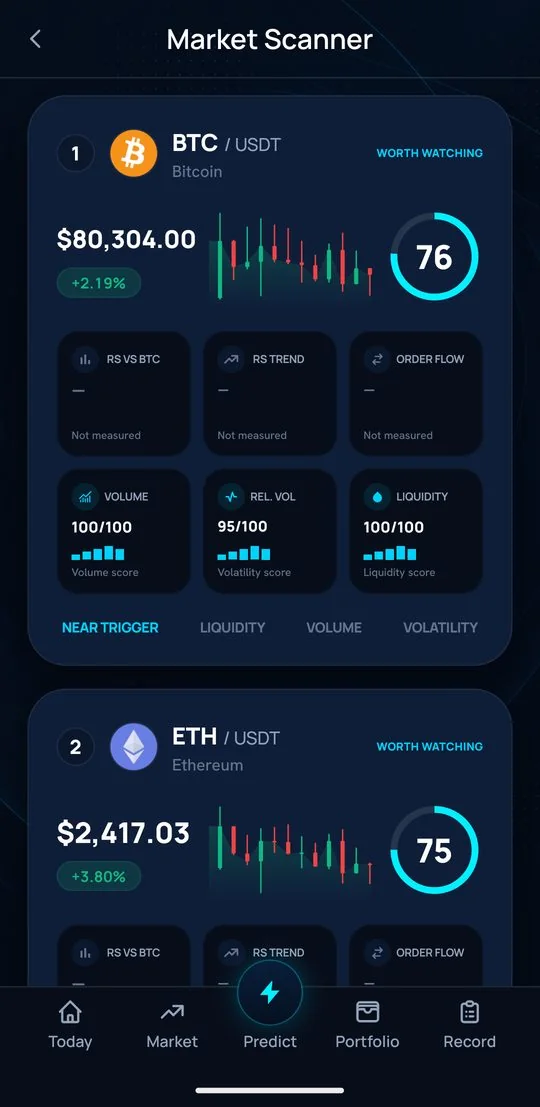
The Market Scanner scores eligible spot pairs from 0 to 100 and lists them in order. The score ranks assets against each other within one scan. It is not a recommendation and not a probability.
Ranked cards, each with its price and 24-hour change
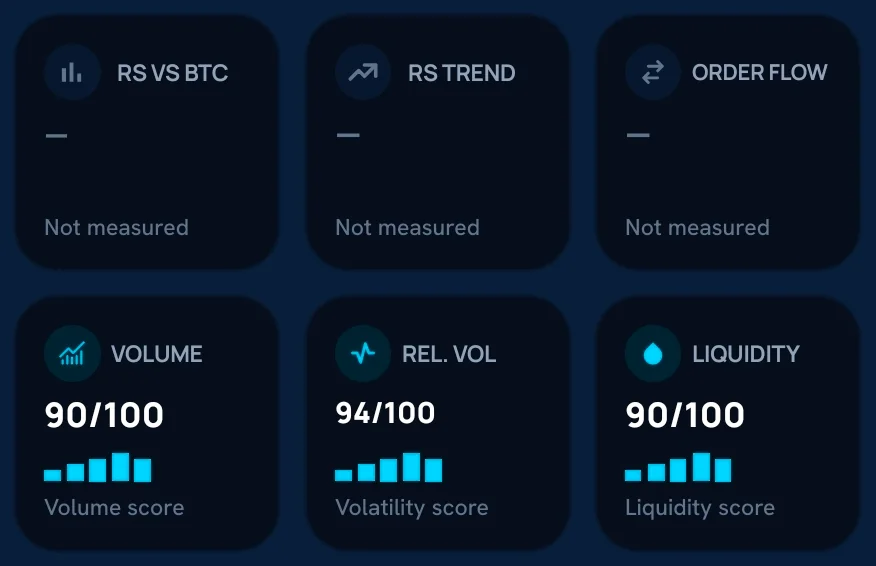
Opportunity Details compares an asset’s return with Bitcoin and with a basket of other assets over the same candles. Each scanner card keeps two slots for relative strength. In this capture they read “Not measured”: the scanner does not measure them for each row, so the card shows a dash, not a number.
RS vs BTC and RS Trend: not measured on this card, and labelled so
Volume, relative volatility and liquidity: measured, each scored out of 100
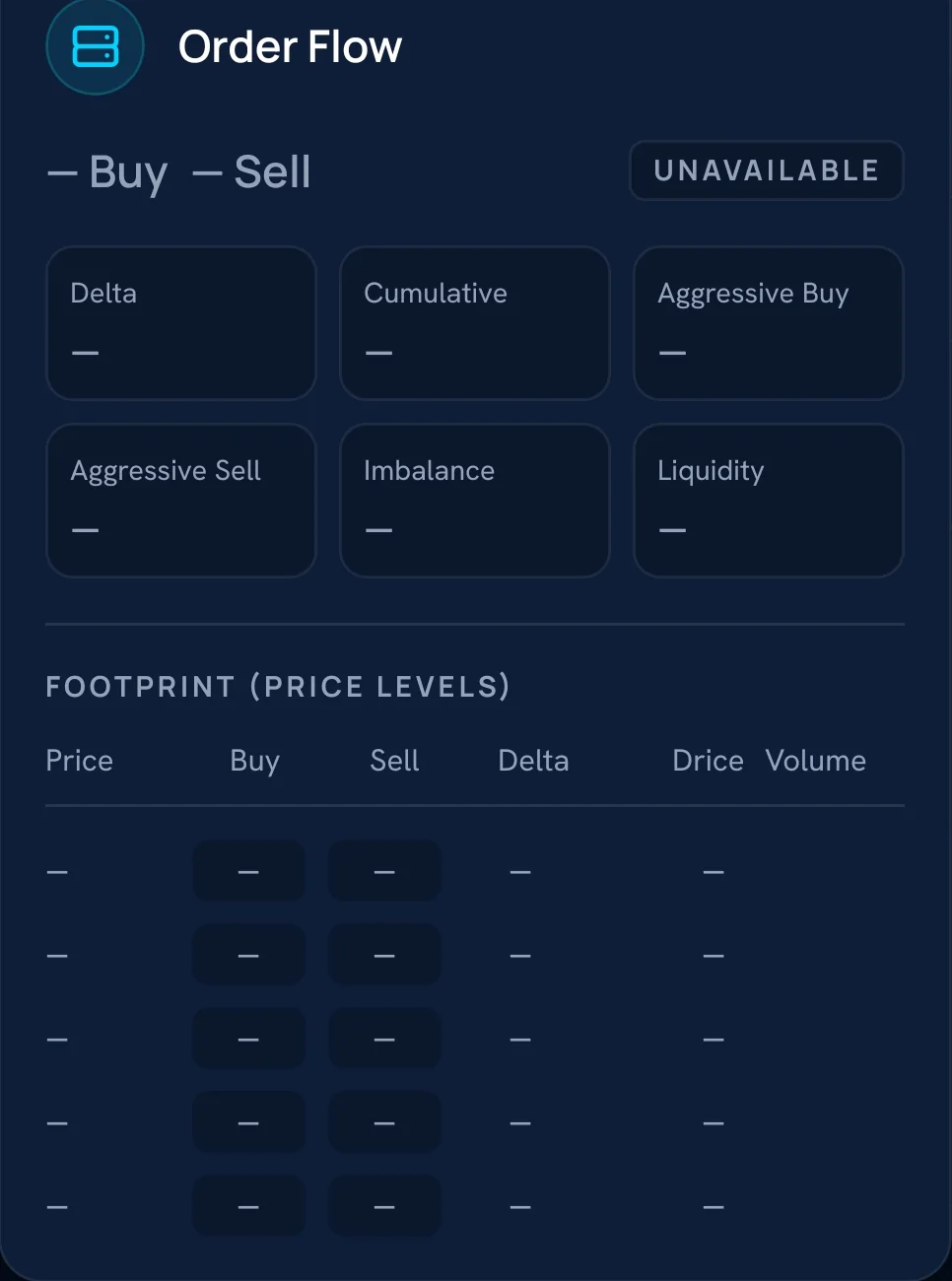
The Order Flow card has fields for buy and sell pressure, delta, cumulative delta, aggressive buying and selling, imbalance and a footprint by price level. Those fields are filled only from a verified trade-level measurement. In this capture there was none.
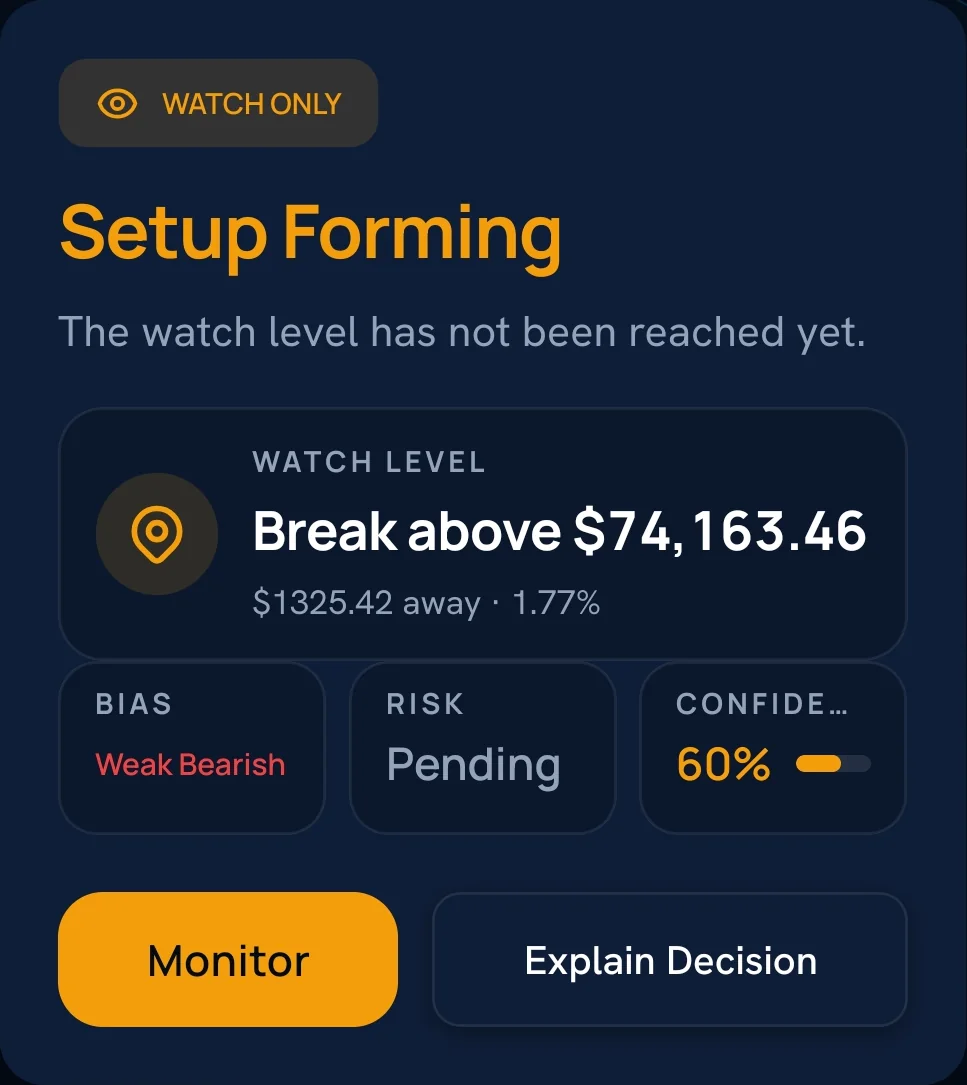
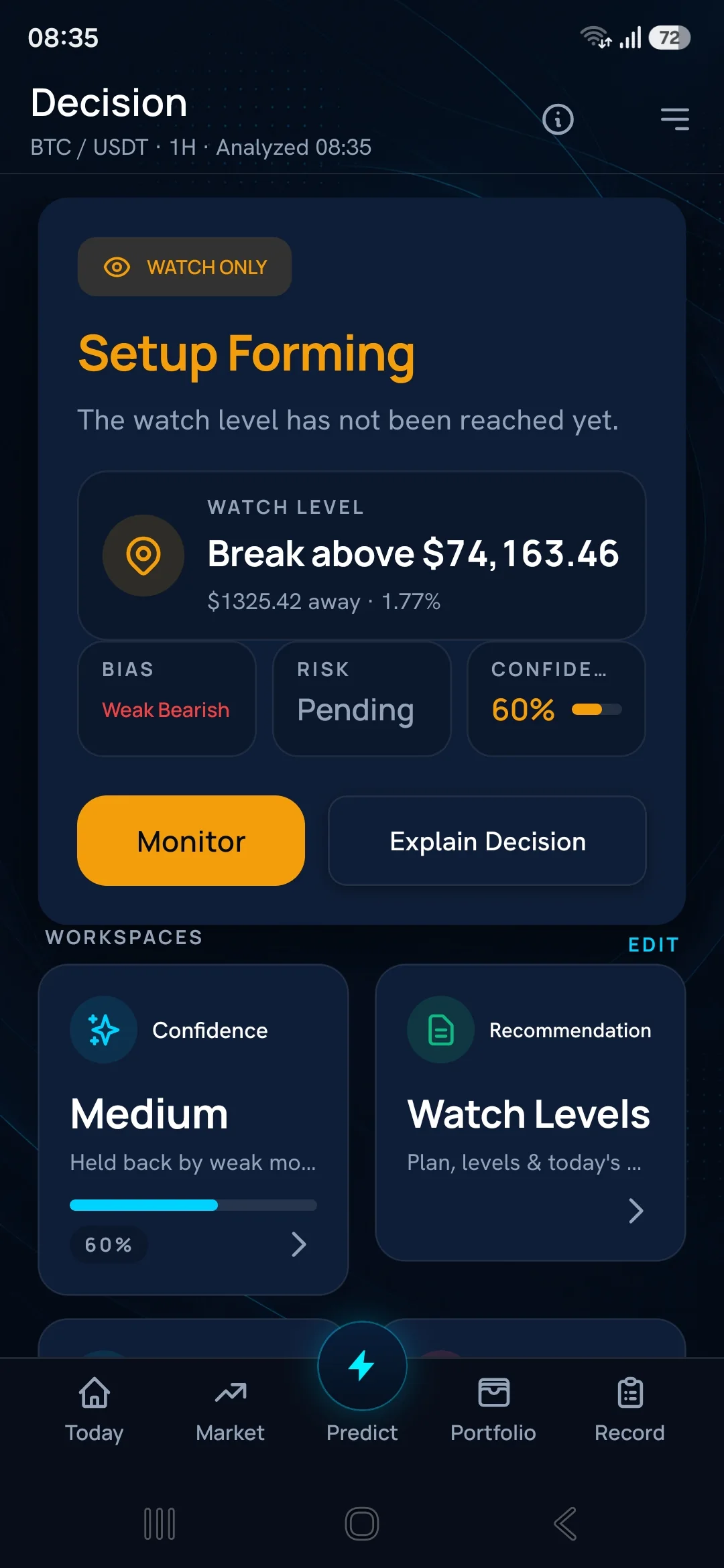
An analysis ends in a state, not a one-word call. This capture shows “Setup Forming”, marked watch only: the level to watch, how far price is from it, the bias, the risk status and the confidence, on one card.
State: Setup Forming. The watch level has not been reached yet
Watch level, with the distance to it in dollars and percent
Protection Bot is being built for Spot positions you bought yourself, around one rule: it can only sell. Today its screen in the app is not connected. It reads no account and places no order, and it says so.
Notice: “Binance connection unavailable”
Binance account: not authorised
Protection engine and position discovery: unavailable
Product interface preview. Market values shown reflect the captured interface and are not necessarily live.
Everything You Need to Understand Market Behavior.
Nine readings of the same market, from a first glance to a full AI-assisted analysis. Each one says what it measured and where it stops.
Market Snapshot
Start with where the market stands.
Price, 24-hour change and volume for the pair you choose, with a short candle chart. Every later reading starts from here.
Top Opportunities
A shortlist of assets worth a closer look.
The Market Scanner scores spot pairs from 0 to 100 and ranks them, so you look closely at fewer assets. The score is not a recommendation or a probability.
Liquidity sweeps, points of interest, fair value gaps and changes in state of delivery, read from closed candles. A signal that is absent reads “Not present”.
On request, AI agents analyse the market and debate it, fixed rules check the result, and you get a decision state to review. The decision stays yours.
A market can be rising on the daily chart and falling on the 15-minute one. Multi-timeframe crypto analysis keeps both in view. Choose a timeframe to see the role it plays in QRYVEX.
TimingSupporting timeframe
QRYVEX reads 15-minute candles for entry timing and for short-term flow estimates. It supports the longer reads and is not analysed on its own.
The default horizonAnalysis horizon
An analysis starts on the 1-hour horizon unless you choose another, and the Market Scanner’s ranking is read on it.
Swing contextAnalysis horizon
A full analysis horizon of its own. Its trend also feeds the higher-timeframe bias that shorter reads are judged against.
The bigger pictureAnalysis horizon
The widest lens QRYVEX analyses. Together with the 4-hour trend it sets the higher-timeframe bias.
Illustration only. The line is not market data, and the windows are not to scale. The strip underneath shows how much of the wider picture each timeframe looks at.
Higher-timeframe context
The 4-hour and daily trends set a bias. A shorter-term setup is judged against it, not in isolation.
Trend alignment
Trend direction and strength are read per timeframe, and the app reports how many of them agree.
Market structure
Structure signals carry the timeframe they were found on, so a 1-hour sweep is never mistaken for a daily one.
Confirmation across timeframes
When timeframes disagree, QRYVEX says so. A timeframe it cannot read is left out, not filled with a guess.
Discover Opportunities with Context.
Top Opportunities is a ranked shortlist from the Market Scanner. Each card says why the asset is on the list, so you can decide what deserves a closer look before you spend time on it.
What stands behind a card
Relative strength
Trend conditions
Volume
Liquidity
Momentum
Market regime
Near-trigger context
How each of the seven is read
Relative strength
Opportunity details compare the asset with Bitcoin and with a basket of other assets.
Trend conditions
Trend structure on the ranked timeframe is part of the score.
Volume
Traded volume, and volume against its own recent baseline.
Liquidity
A liquidity score from 24-hour market data.
Momentum
How sharply the asset has moved over the last 24 hours, in either direction.
Market regime
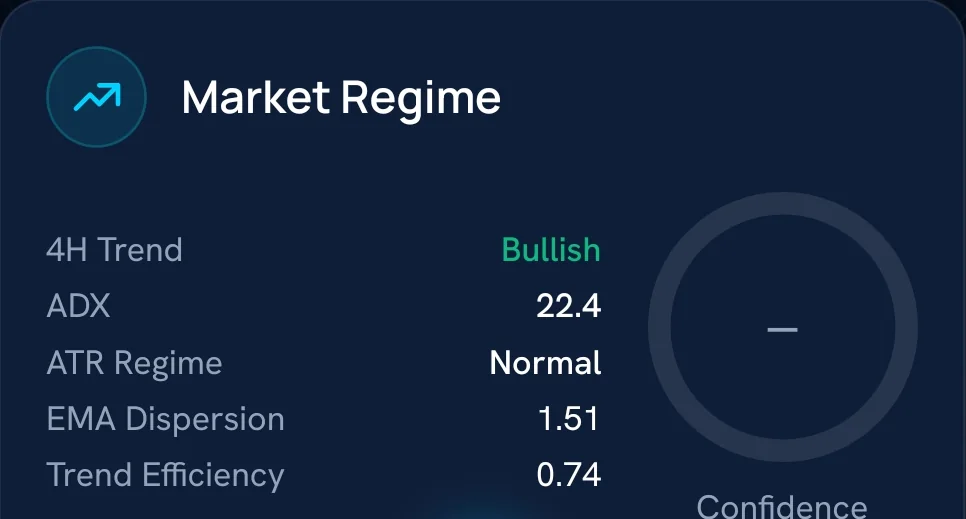
Details show the 4-hour trend, ADX, the ATR regime and trend efficiency.
Near-trigger context
A tag marks assets whose price is close to a watch level.
On this card, RS vs BTC, RS Trend and Order Flow read “Not measured”. The scanner does not measure them for each row, so the card shows a dash, not a number.
App screenshot. Not live data.A real opportunity card from the Market Scanner. The score ranks assets against each other. It is not a recommendation or a probability.
Market Intelligence
Go Beyond the Score.Read the Market Behind It.
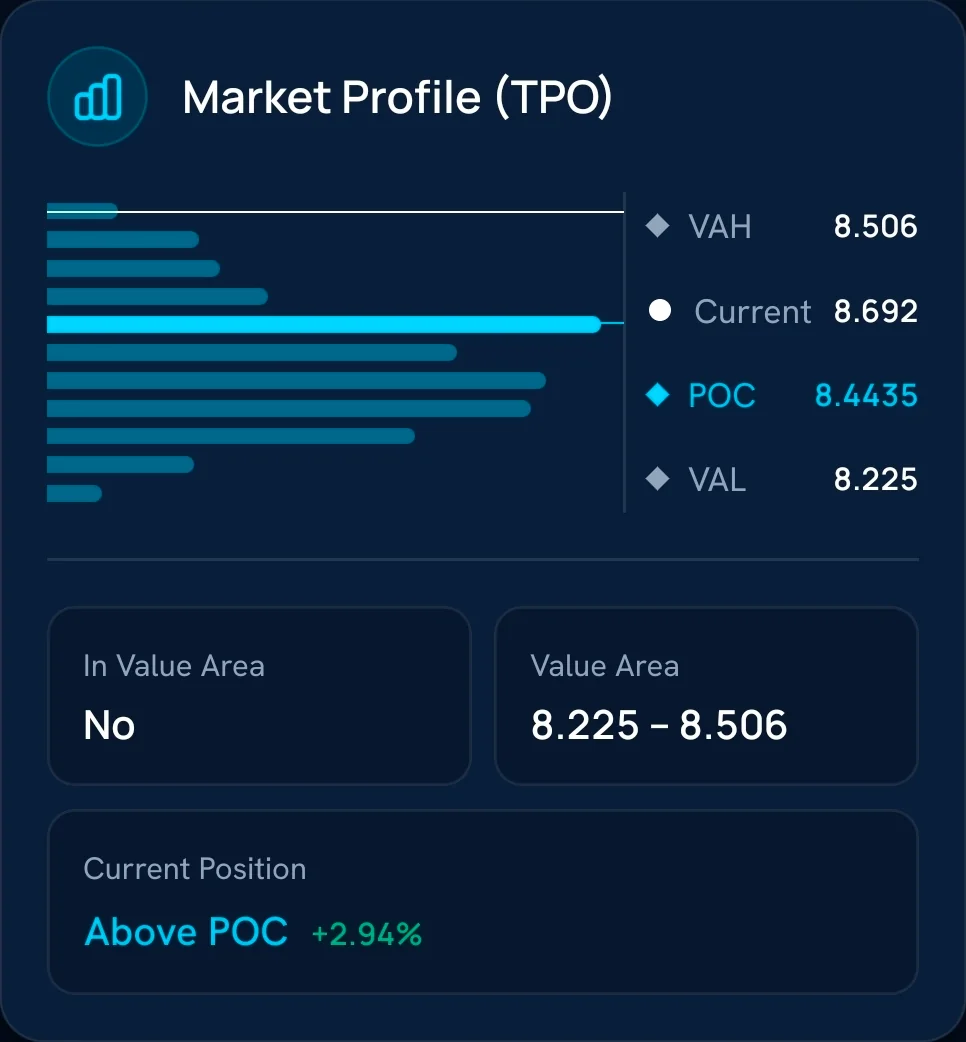
Open an opportunity and QRYVEX shows why it ranked. Crypto market structure, order flow, relative strength, market regime and market profile each get a card of their own, and every card states what it measured, or says that it measured nothing.
Market Regime
Know what kind of market you are reading.
The same signal means one thing in a trend and another in a range. The Market Regime card states the conditions around an asset before you weigh anything else.
The Confidence gauge shows a dash. The regime engine states no confidence figure, so the app shows none.
What the fields on the Market Regime card mean
4H Trend
The direction of the 4-hour trend.
ADX
Trend strength on a scale of 0 to 100. It measures strength, not direction.
ATR Regime
The volatility regime, read from average true range.
EMA Dispersion
How far apart the short, medium and long moving averages sit, in multiples of ATR.
Trend Efficiency
How directly price travelled: the net move divided by the path it took.
Order flow describes the trades themselves: who was buying, who was selling, and how hard. QRYVEX fills this card field by field, and only from a verified measurement.
In this capture no trade-level measurement covered the period, so every field shows a dash and the card reads “Unavailable”. Activity estimated from candles has its own sheet, labelled “Candle approximation, not trade-accurate”, and is never placed in these fields.
What the fields on the Order Flow card mean
Buy, Sell, Delta, Aggressive Buy and Aggressive Sell
Shown only when the last closed candle was measured from the exchange’s trade prints.
Cumulative
Cumulative delta, shown only when every candle of the session was measured from trades.
Imbalance and Liquidity
Shown only while the order book is synchronised, trusted and fresh.
Footprint (Price Levels)
Buying and selling by price level, from the trade tape. Without it, the rows show dashes.
An asset that climbs while everything climbs is telling you about the market. One that climbs on its own is telling you about itself. Opportunity Details compares the asset’s return with Bitcoin and with a basket of other assets over the same candles, and states a verdict.
There is no sector comparison. The app has no sector taxonomy, so that slot reads unavailable.
The verdicts the card gives
Outperforming
The asset returned more than the basket over the same candles.
In line
It returned the same.
Underperforming
It returned less.
Unavailable
The comparison could not be made, and the card says so.
Market structure, one signal at a time.
Structure is read from closed candles. Each signal has a row on the Structure Confluence card that states its lifecycle, its direction and its timeframe, such as “Confirmed · Bullish · 1h”. A signal that is not there reads “Not present in the current structure”.
Liquidity Sweep
Price pushes through a level where liquidity rests, then closes back inside it. QRYVEX records the push and the return as two separate events: a sweep stays provisional until a reclamation confirms it.
Liquidity Sweep: its states and what its sheet shows
States
Provisional, Confirmed, Failed, Invalidated or Expired
Its sheet
Level Swept, Reclamation Price, Timeframe, Status
IFVGInversion fair value gap
A price gap that has been closed through and now plays the opposite role. A bullish gap closed through downward becomes resistance; a bearish gap closed through upward becomes support. It exists only once that close-through is confirmed.
IFVG: its states and what its sheet shows
States
Created, Retesting, Holding, Failed, Invalidated or Expired
Its sheet
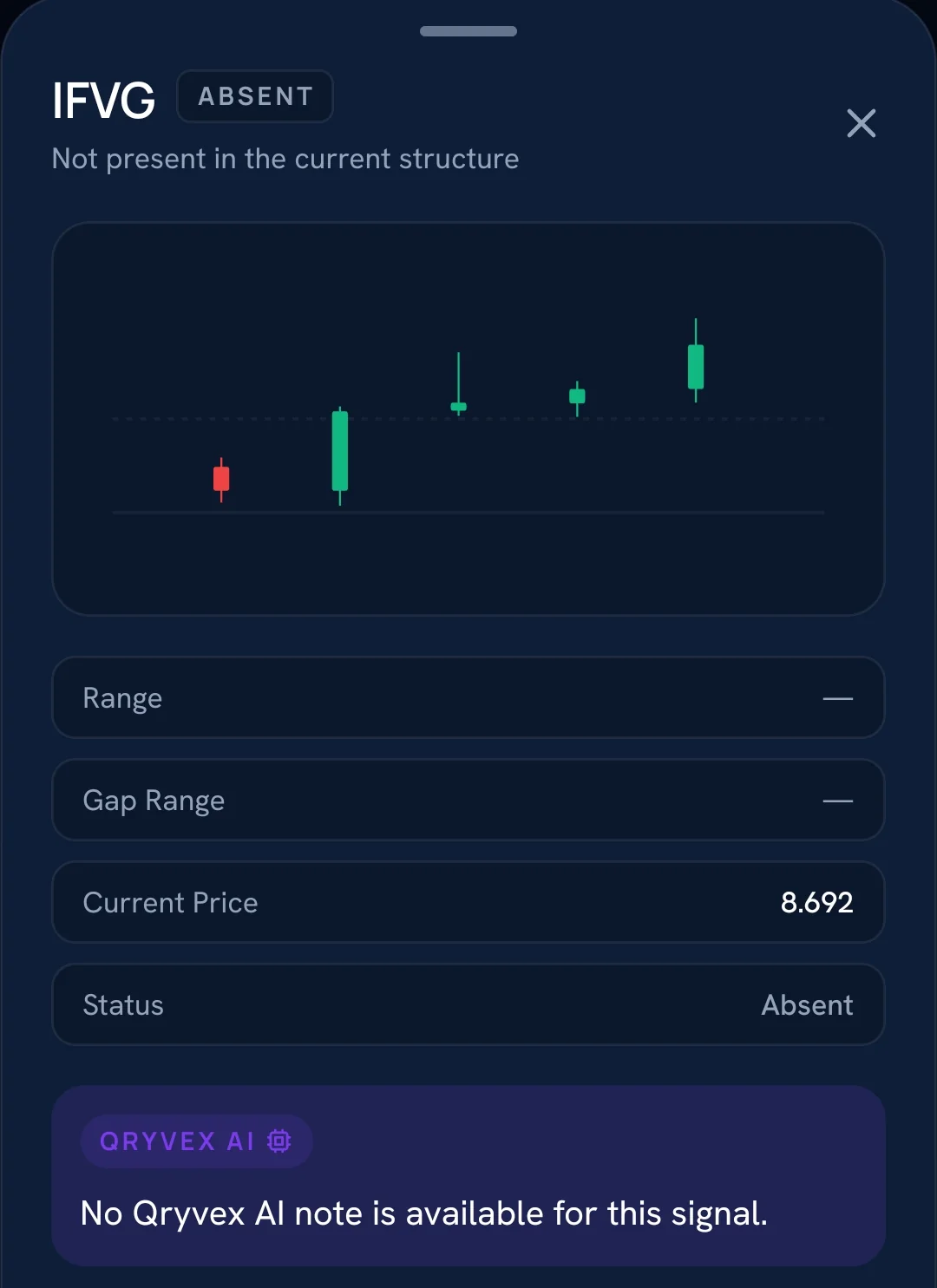
Range, Gap Range, Current Price, Status
CISDChange in state of delivery
After a run of selling, a strong move up closes beyond the open of the candle that began the run. The bearish case is the mirror image. QRYVEX treats it as a structural transition, never as a trade signal.
CISD: its states and what its sheet shows
States
Provisional, Confirmed, Invalidated, Superseded or Expired
Its sheet
CISD Level, Displacement Velocity, Market Bias, Status
The three rows are app screenshots. Not live data.
A row opens a sheet. This is the IFVG sheet when no gap is present: Range and Gap Range show a dash, Status reads Absent, and the AI note says that none is available.
Decision Intelligence
Not Just a Signal.Understand the Evidence.
A QRYVEX analysis does not end in a one-word call. It ends in a decision state, the evidence that supports it, and the conditions still in its way.
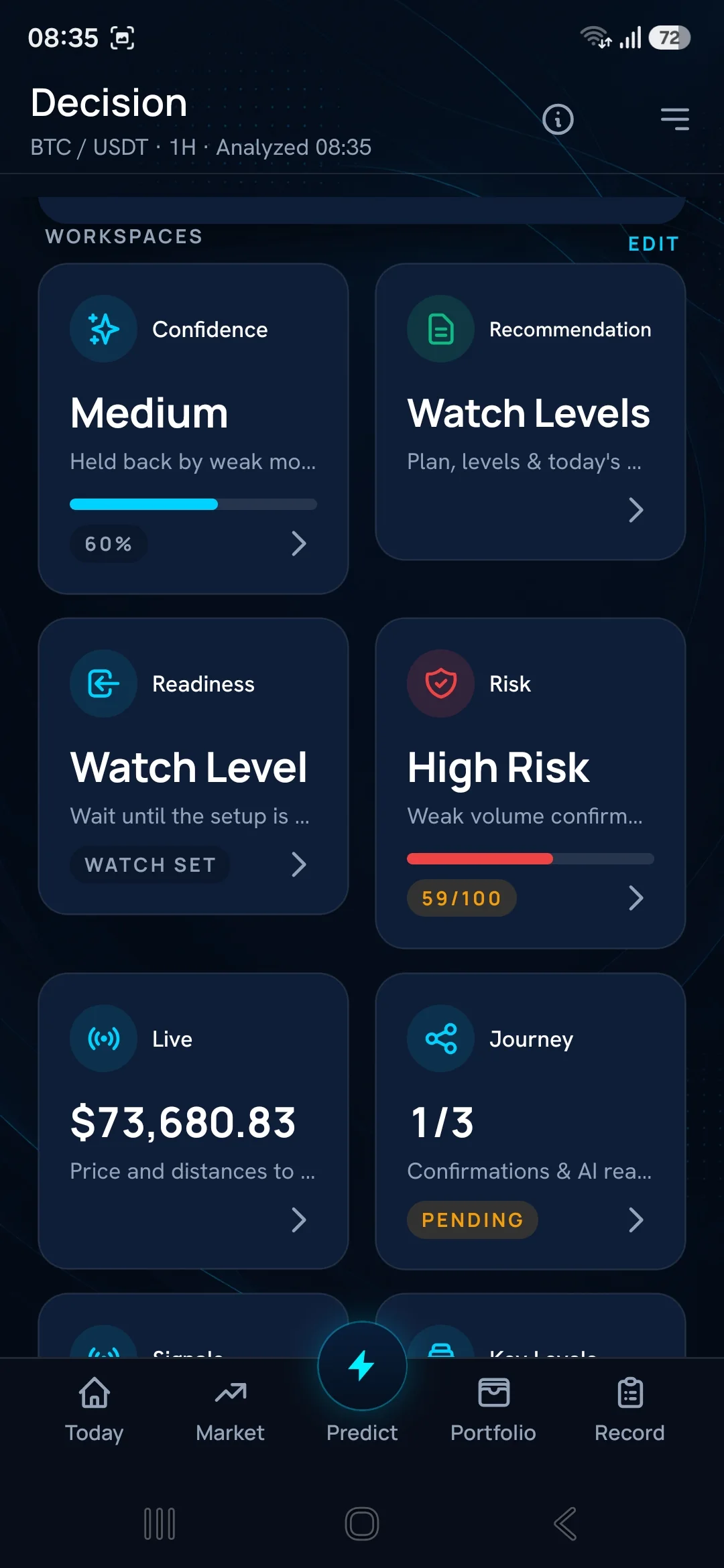
Confidence, Recommendation, Readiness, Risk, Live and Journey. Each one opens a part of the evidence behind the state.
Conditions and limitations
Blocked, failed and invalidated states are shown as plainly as a ready one.
Risk-aware planning
When a setup is ready for review, the Spot Plan lays out entries, allocation, a maximum risk per trade and protection rules for you to check.
The path a setup takes, in the app’s own words
Analyzing
AI analysis is running for this asset and timeframe.
Setup Forming
Watch level has not been reached yet.
Near Watch Level
Price is approaching the watch level.
Waiting for More Evidence
Price reached the entry zone. Qryvex is waiting for stronger market evidence before entry.
Ready for Review
Conditions are met. Review the trade plan and risk before entry.
“Ready for Review” is not an instruction to buy. It means the conditions the analysis set have been met and the plan is ready for you to check.
When a setup does not get there: the five states that stop it
Blocked
A hard safety gate is blocking this setup.
Confirmation Failed
A required confirmation failed for this setup.
Confirmation Passed — Risk Blocked
Confirmations passed, but risk is blocking entry. Monitor only.
Setup Invalidated
The market changed before the setup completed. The previous analysis is no longer valid.
Analysis Unavailable
We couldn’t complete a reliable analysis right now. No entry is confirmed.
Product interface preview. Market values shown reflect the captured interface and are not necessarily live. The screens are an example of the interface, not a recommendation. A confidence score describes how far the analysis inputs agree. It is not the probability that a trade will be profitable.
Protection Bot is a workspace being built for one job: protecting Spot positions you bought yourself. It is in development and not available yet. In today’s app its screen connects to no exchange account, reads no position and places no order.
A protective stop limits a loss. It does not prevent one. Price can move through a stop, an exchange can reject or delay an order, and software can fail.
App screenshot. Not live data.The Protection Bot screen in the current app, captured 30 October 2026. Product interface preview. Market values shown reflect the captured interface and are not necessarily live.
The rules it is being built around
Spot only
Built for Binance Spot positions. No futures, no leverage and no short selling.
SELL only
Protection, recovery, and exits can never create a BUY order.
Your entry, its exit
You buy the position yourself. The bot is designed to manage the way out only: a trailing SELL, a SuperTrend exit or an emergency SELL.
Stops only move up
Any request to lower or keep the same stop is rejected.
ATR-based protection
The initial stop is the entry minus the configured ATR multiple, rounded to the exchange tick size. SuperTrend and ATR trailing can then raise it.
Verified status only
A position is only considered protected after Binance confirms an active stop order.
Before anyone can use it
A Binance Spot account of your own
The design asks for three permissions: to read balances, to read orders, and to send and cancel Spot SELL orders. It asks for no withdrawal permission.
Authorisation that has not been given
QRYVEX has no authorised Binance integration, and the exit engine is not authorised for live use. It can run in paper and shadow modes; live operation needs a separate approval.
No date
No release date has been announced. Today QRYVEX connects to no exchange and places no order, as its Privacy Policy and Risk Disclaimer state.
What its screen says today, row by row
Binance accountNot authorised
QRYVEX has no authorised Binance integration, so no account can be connected or synced.
Protection engineUnavailable
The QRYVEX backend runs no protection engine service.
Position discoveryUnavailable
Positions are read from the Binance account, which is not connected.
Verified protectionUnknown
A position counts as protected only once Binance confirms an active stop order, and nothing can be read back from Binance.
Experience QRYVEX in Action.
A short film of the app: the first screens, market structure and order flow as QRYVEX presents them, and how a decision is shown with its evidence.
It plays only when you press play.
Sound is yours to switch off, and captions are on from the start.
Nothing is downloaded until you start it.
The film shows app screens for illustration. The “BUY / 78%” card in it is marked as an example and is not a real recommendation.
Analyze trends, market structure, volume, and liquidity across multiple timeframes.
Discover opportunities through intelligent market analysis.
Every insight is supported by evidence, helping you make clearer, more informed trading decisions.
Less noise. More clarity. Better decisions.
QRYVEX. Trade smarter with evidence.
More Than Indicators.A Deeper Understanding of the Market.
Clarity Over Noise. Evidence Over Guesswork.
Indicators describe price. QRYVEX adds what a price line leaves out: the timeframes around it, the structure beneath it, and how far each reading can be relied on.
Multi-Timeframe Intelligence
A QRYVEX analysis reads trend direction and strength from 5 minutes to 1 day, and names the conflict when timeframes disagree.
Evidence-Based Analysis
Each decision state comes with the readings that support it, the confirmations that passed and the conditions still in its way.
Transparent Data Sources
Every reading is marked measured, estimated or unavailable where it is shown. An estimate never fills in a missing measurement.
Market Structure
Liquidity sweeps, points of interest, inversion fair value gaps and changes in state of delivery, each with a state, a direction and a timeframe.
Liquidity and Order Flow
Each ranked asset carries a liquidity score. Order flow is shown only when it is measured from trades.
Risk-Aware Market Context
Every decision carries a risk reading, with the market regime beside it. Blocked and failed states are shown as plainly as a ready one.
How It Works.
01
Discover
Explore market conditions and opportunities.
Open Today for a market snapshot and the top of the Market Scanner’s ranking.
02
Analyze
Understand trends, structure, volume, and liquidity.
Open an opportunity to see relative strength, order flow, market regime, market profile and structure, each with its state.
03
Evaluate
Review evidence and make informed decisions independently.
Run an analysis to get a decision state, the evidence behind it and a spot plan to review. What you do next is your decision.
Trust the Data Behind Every Insight.
Built Around Evidence. Designed for Clarity.
Every reading in a market tool is one of three things. QRYVEX tells you which, in the place where the reading is shown.
Measured
Values supported by a verified data source.
App screenshot. Not live data.
Prices, closed candles, traded volume and, where a trade feed covers the period, order flow.
How the app words it
90/100
Confirmed · Bullish · 1h
Estimated
Values derived from estimates and explicitly labeled as such.
App screenshot. Not live data.
Derived from candles when trade-level data is not used. An estimate keeps its own labelled view and is never used to fill in a missing measurement.
How the app words it
Candle approximation, not trade-accurate
Unavailable
Data that does not satisfy coverage or quality requirements is not presented as confirmed.
App screenshot. Not live data.
The reading stays empty, and the app says so in words on the screen where the number would be.
How the app words it
Not measured
Unavailable
Not present in the current structure
Product interface preview. Market values shown reflect the captured interface and are not necessarily live.
What QRYVEX does
Reads spot markets: a market snapshot, a ranked scanner and multi-timeframe analysis.
Runs an AI-assisted analysis when you ask for one, then checks it against fixed rules.
Shows the evidence behind a decision state, and what is still in its way.
Labels every reading as measured, estimated or unavailable.
What QRYVEX does not do
It does not place, route or execute orders.
It does not connect to an exchange, and it never has access to your funds, keys or wallets.
It does not offer futures or leverage.
It does not give financial advice or promise a result.
Why data can be missing
A reading can be unavailable because a trade feed does not cover the period, an order book is not synchronised, a scan has not finished, or your device is offline. QRYVEX shows that state instead of a stand-in value.
Why context matters
A signal means little on its own. QRYVEX pairs each one with its timeframe, the market regime and the higher-timeframe trend, so you can judge it in the conditions it appeared in.
The limits of AI analysis
AI analysis can be wrong. It depends on third-party data and automated models, and either can be late, incomplete or mistaken. A confidence score describes how far the model’s inputs agree. It is not the probability that a trade will be profitable.
Access & Availability.
Where QRYVEX stands today, stated plainly. It is spot crypto market intelligence built for phones, and it is not in the stores yet.
QRYVEX is not listed on Google Play yet. No release date has been announced.
App Store (iPhone)Coming Soon
QRYVEX is not listed on the App Store yet. No release date has been announced.
Plans and priceNot announced
No price has been set. Nothing is sold on this website: it has no checkout and no sign-up form.
Protection BotIn development
Not available yet. It connects to no exchange account and places no order today.
Access todayBy e-mail
To ask about access, write to support@qryvex.com.
Frequently Asked Questions.
Straight answers about what QRYVEX does and what it does not. Something missing? Write to support@qryvex.com.
What is QRYVEX?
QRYVEX is a mobile app for analysing cryptocurrency spot markets. It brings a market snapshot, a ranked list of opportunities, multi-timeframe analysis, market structure, volume and liquidity readings, and an AI-assisted decision analysis into one place.
It is an information tool. It is not a broker, an exchange or a wallet, and it does not place trades.
How does AI-powered market intelligence work?
When you run an analysis for an asset and a time horizon, QRYVEX gathers market data and passes it to a set of specialised AI agents. Each one looks at the market through a single lens: technical indicators, chart patterns, volume, multi-timeframe alignment, news and social sentiment, macro conditions, and risk.
Their views are debated, and the result then passes through fixed, rule-based checks before the app shows a decision state with the evidence behind it. The Market Scanner works differently: it ranks assets with deterministic scoring and uses no AI.
Which crypto market conditions does QRYVEX analyze?
Trend and momentum, volume and volatility, market regime, market structure (liquidity sweeps, points of interest, fair value gaps and changes in state of delivery), market profile, relative strength against Bitcoin and a basket of other assets, liquidity, and order flow when trade-level data is available.
QRYVEX covers spot markets only. It does not offer futures or leverage.
What is multi-timeframe analysis?
It means reading the same market on more than one timeframe before drawing a conclusion. In QRYVEX you can run an analysis on a 1-hour, 4-hour or 1-day horizon.
Each analysis also reads trend direction and strength on several timeframes, from 5 minutes to 1 day, reports how many of them agree, and tells you when a shorter timeframe conflicts with a longer one. A timeframe the app cannot read is left out, not filled with a guess.
How does QRYVEX identify opportunities?
The Market Scanner scores eligible spot pairs from 0 to 100 using market data only: momentum, liquidity, traded volume and volatility over 24 hours, then trend, relative volume and position in range on the timeframe being ranked, plus how close price is to a watch level.
The score ranks assets against each other within one scan. It is not a buy signal, an entry price or a probability of profit. An asset whose watch level cannot be determined is left off the list.
Does QRYVEX execute trades?
No. QRYVEX never places, routes or executes an order, and it never has access to your funds, exchange accounts, private keys or wallets. It does not connect to an exchange.
Any trade you make is made by you, on a venue you choose.
Protection Bot, shown on this page, is in development and not available. It does not change this answer: today it reads no account and places no order.
Does QRYVEX guarantee trading profits?
No. QRYVEX provides analysis for information only. It is not financial advice, and nothing in it is a recommendation to buy or sell.
Cryptocurrency markets are volatile, and you can lose some or all of the money you commit. The analysis can be wrong, late or unavailable. A confidence score describes how far the model’s inputs agree; it is not the probability that a trade will be profitable.
How does QRYVEX communicate unavailable or estimated data?
In plain words, on the screen where the reading would be. A value that is not measured shows a dash and “Not measured”. A card whose source is missing says “Unavailable”. A structure signal that is not there reads “Not present in the current structure”.
Where a figure is estimated from candles instead of measured from trades, it is labelled as an estimate, for example “Candle approximation, not trade-accurate”. Estimates are kept in their own labelled views and are not used to fill in a missing measurement.
Is QRYVEX suitable for beginners?
QRYVEX states its readings in plain language and shows the evidence behind a decision, which helps while you are learning. It also uses trading terms such as market structure, liquidity and order flow, so some background makes it easier to use.
It does not make decisions for you. Whatever your experience, you remain responsible for your own decisions, and you must be 18 or older to use the app.
Is Protection Bot available?
Not yet. Protection Bot is in development and is not available. In today’s app its screen connects to no exchange account, reads no position and places no order, and it says so on the screen.
It is being built for Spot positions you bought yourself, and it can only sell: its rules do not allow it to create a buy order. No release date has been announced.
Where can I download QRYVEX?
QRYVEX is not listed on Google Play or the App Store yet. Both are marked “Coming Soon” on this page, and no release date has been announced.
No price has been announced, and nothing is sold on this website. Until the app is listed, you can ask about access by writing to support@qryvex.com.
Understand the Market.Make More Informed Decisions.
Bring market intelligence, context, and evidence into one clearer experience.
Spot markets only. No futures, no leverage.
Analysis, not execution. QRYVEX places no orders.
Every reading says whether it was measured, estimated or unavailable.
Availability. QRYVEX is a mobile app. It is not listed on Google Play or the App Store yet, and this site has no sign-up form. To ask about access, write to support@qryvex.com, or read where things stand.